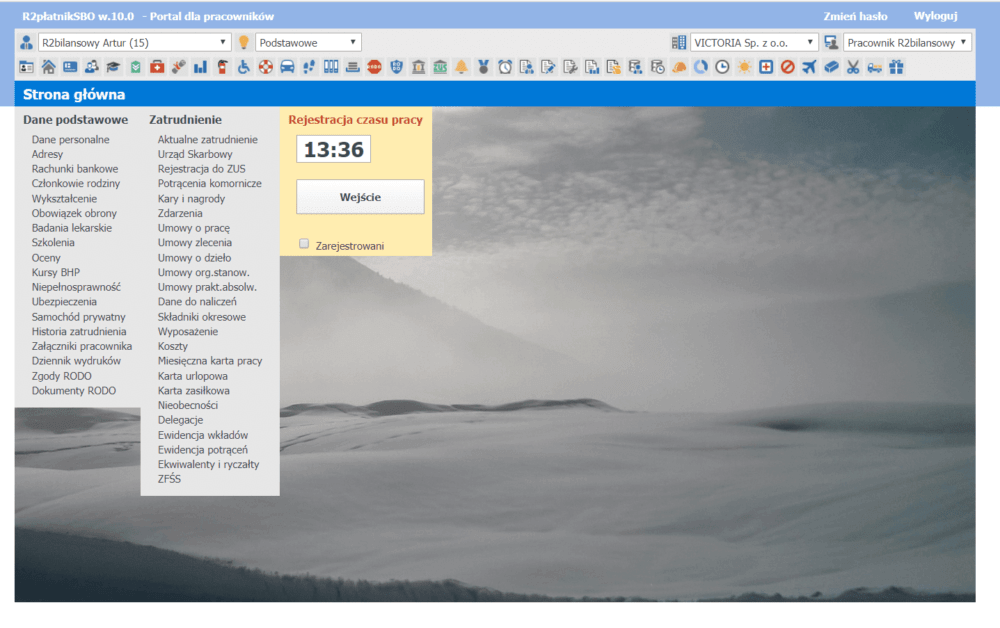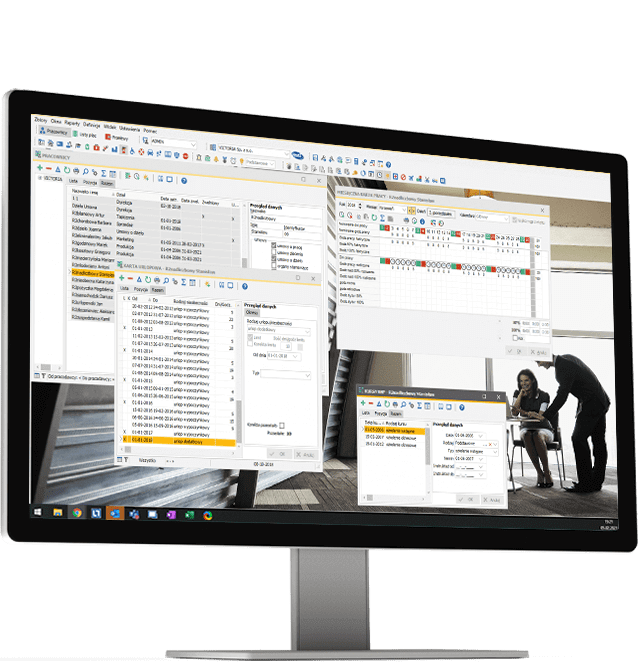
R2Płatnik is a fully functional HR and payroll software. Thanks to R2Płatnik, you can conduct human resources, calculate remuneration in accordance with current regulations and make automatic settlements with the tax office and ZUS. Moreover, R2Płatnik is a tool that is fully integrated with SAP Business One.
Quick access to personal data
Correct calculation of remuneration
Quick payroll cost analysis
Timely transfers to employee accounts
In the time of a common “home office”, it is very important to be able to service employees remotely on a regular basis. Thanks to the prepared environment in the cloud, each employee and system administrator has access to the software from any place and on any device.

Possibility to import employee data (including the opening balance) from the Płatnik ZUS program and other systems, search for employees with the required qualifications and completed courses
Reminding about the expiring dates of medical examinations and OHS courses, correct interpretation of overlapping periods in the history of employment and education
control of the balance of installment loan payments, control of alimony and other bailiffs, car lump sum settlement, record of penalties and awards
The payroll calculator enables quick net – gross conversions with full salary costs, takes into account the second job (employment) in the same company, apart from employment contracts, records notifications and deregistration from insurance, adjusting standard forms (contracts, certificates and others) to internal requirements
Layout of the equipment at a given position (e.g. protective clothing, cleaning agents) and control of its useful life

Various working time systems in accordance with the labor code, control of working time standards in the agreed settlement period
Determining the nominal working time for groups of employees, control of hours to be worked or picked up by the employee, the possibility of cooperation with RCP systems (work time registration) and with systems of settling the working time of drivers (tachograph)
Explanation of the amount of the automatically introduced leave limit, taking into account the change of jobs and the degree of disability during the month
Explanations of the amount of the automatically calculated sickness fee along with the method of calculating (supplementing up to a full month) grounds, corrections to previous sick leave
Library of orders, i.e. contracts or projects implemented by the company, cost records separating the employee’s work performed within individual departments and orders, the ability to determine the costs in detail directly when filling in the job card
Possibility of settling piecework directly in the work card, detailed settlement of piecework costs

Various types of basic and additional payrolls prepared as standard, a unique method of parameterization of new payroll components in accordance with the remuneration regulations, a definable system of detailed settlement of remuneration costs
Updating the billing parameters via the Internet, extensive explanations of the calculation of key ingredients (holidays, sick leave), automatic calculation of thirteen, adjustments and corrections, legible printouts of payrolls and strips for employees with the toner saving option, the possibility of sending strips by e-mail, original billing control system
Calculation and recording of other revenues (mandate contracts, contracts for specific work), hint of the gross amount after providing the expected net remuneration, remuneration according to the amount, according to the rate, payment in installments, transparent method of settling ZUS contributions
Automatically generated transfers from salaries, deductions, taxes and social security contributions, cooperation with most banking systems
Annual PIT declarations with the possibility of electronic signature and sending e-Declarations via the Internet, a ZUS statement containing in a compact form all data for ZUS reports, cooperation with the ZUS Płatnik program by directly calling the program with imported data, cooperation with the program for electronic data exchange with the NFZ, cooperation with the SOD PFRON system enabling automatic data transfer to the Subsidy Service System
Detailed list of labor costs of individual employees with a division into departments and orders, detailed allocation of costs with a division into cost centers or group 5 accounts, cooperation with popular F-K systems
Detailed statements allowing for reliable filling of forms DG-1, Z-02, Z-03, Z-05, Z-06, Z-12 and Z-14, statement of budget security for remuneration, export of statements to other systems (e.g. Excel ) for further analysis, sending statements by e-mail
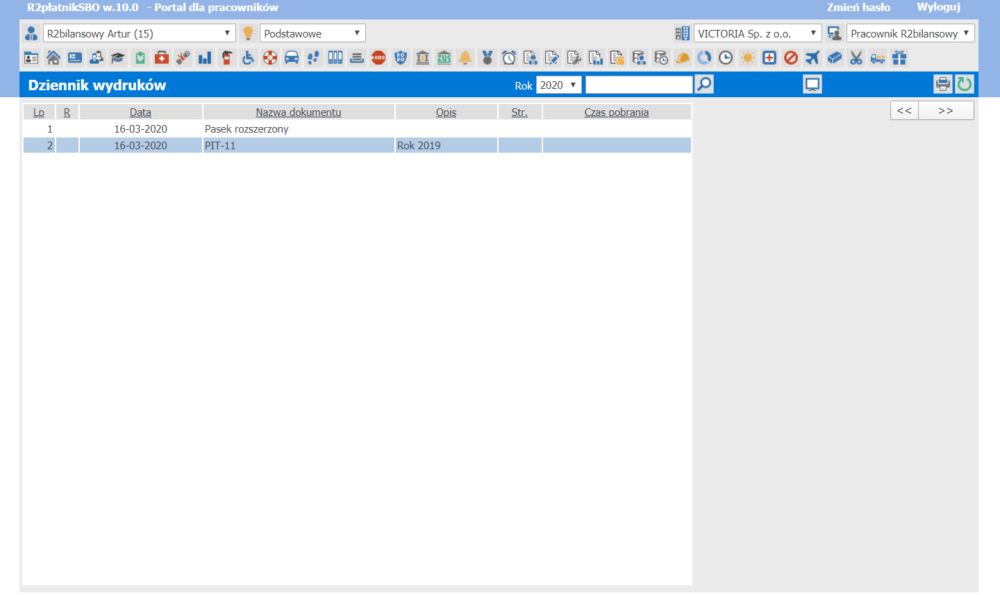
Aesthetic printing of a work certificate including all options, serial printouts of files and PIT declarations without the troublesome transfer of sheets in a printer, the ability to prepare your own documents to the internal needs of the company
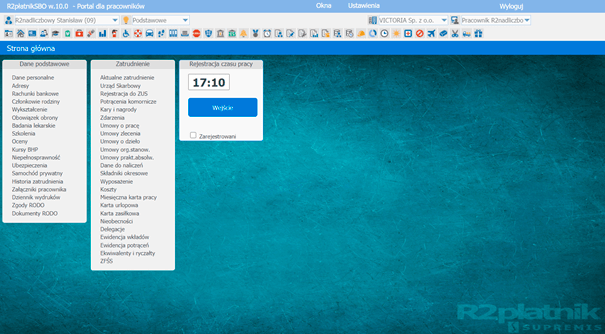
the possibility of making available on the website, among others pay slips, PIT forms or earnings certificates,
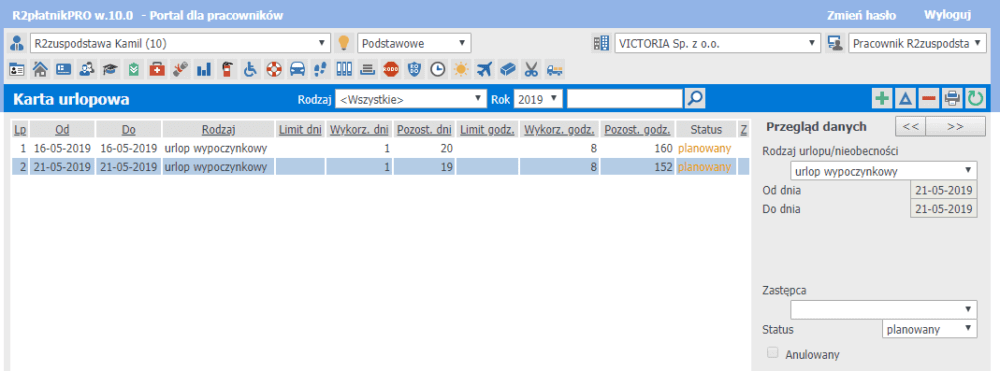
Adding an application causes the procedure of approval / rejection of the application by the superior, via e-mail.
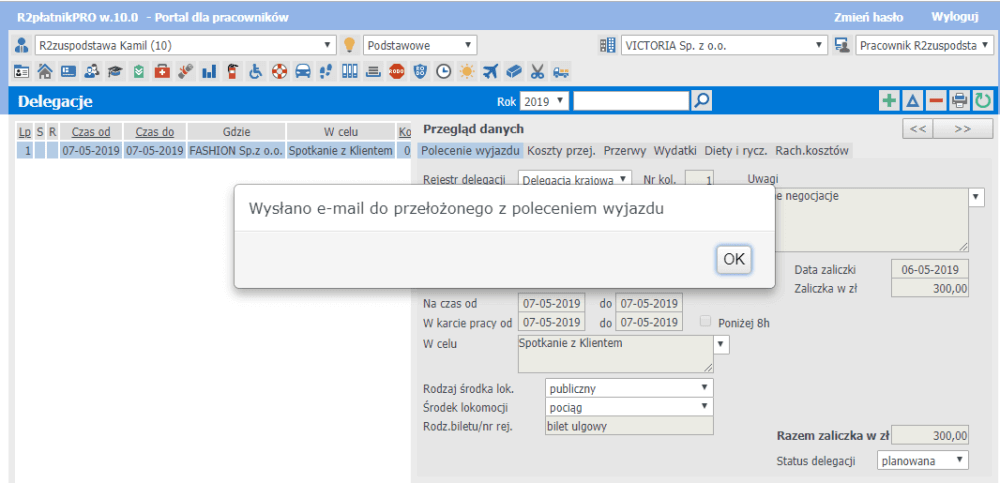
(domestic or foreign delegation) and the settlement of the trip (approval process).
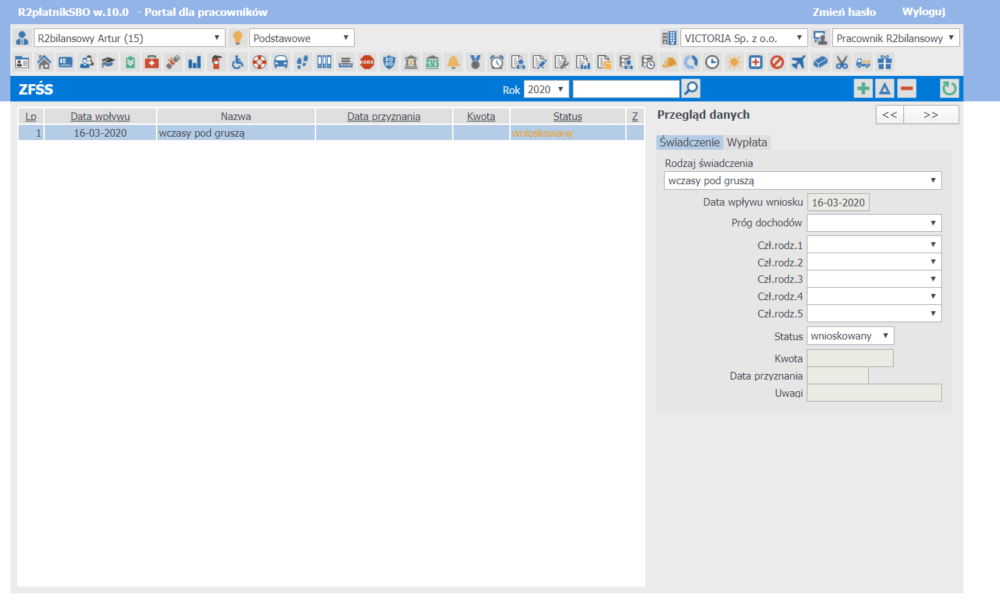
adding an application triggers the application approval / rejection procedure by e-mail.
(NOTE! An extended license is required with the RCP module) – the possibility of registering the entry / exit time, without the need to purchase readers:
The implementation of the system in the company will mean:
Wdrożenie pozwoliło na uproszczenie procesów, oszczędność czasu wykonywania procesów co znacząco ułatwia zarządzanie. Każdy etap przebiegał sprawnie i zgodnie z harmonogramem, a całość współpracy dała nam pewność, że podjęliśmy dobrą decyzję.
Arkadiusz Leszczyński,
Główny Księgowy,
Grupa Azoty Zakłady Fosforowe
Prawdziwy game changer? Możliwość prowadzenia spójnej, jednolitej i automatycznej sprawozdawczości w czasie rzeczywistym, bez potrzeby ręcznego scalania danych z różnych źródeł.
Krzysztof Zagaj,
IT Manager,
Ajinomoto Poland Sp. z o.o.
Robotyzacja i digitalizacja procesów produkcji oraz pozostałych związanych z zarządzaniem łańcuchem dostaw była dla nas niezmiennie istotna. Wdrożenie SAP Business One rozszerzonego o dodatkowe funkcjonalności produkcyjne oraz integracje pozwala nam na podążanie za naszą wizją rozwoju procesów oraz utrzymanie pozycji lidera.
Tomasz Zakrzewski, Managing Director CFO, voestalpine Signaling Poland
Miesięcznie przetwarzamy zamówienia kilku tysięcy klientów. Ta ogromna ilość informacji wymaga niezawodnego wsparcia informatycznego. SAP Business One świetnie sobie radzi z tym zadaniem.
Tomasz Sznajder, Prezes Zarządu Prima Gran
Szukaliśmy programu finansowo-księgowego klasy ERP, który sprostałby wymaganiom międzynarodowej grupy kapitałowej składającej się z wielu spółek w różnych zakątkach świata. System ten miał zapewnić sprawną obsługę wielu walut i wersji językowych, a także umożliwić sporządzanie skonsolidowanych sprawozdań.
Izabella Nalewajek, Head of Group Accounting, G2A.COM
Chcieliśmy poprawić działanie systemu księgowego, jak również wdrożyć elektroniczny obieg dokumentów, w tym zatwierdzanie umów w systemie czy generowanie raportów. Dlatego zdecydowaliśmy się na SAP Business One.
Cezary Waszkiewicz, Financial Manager, Adgar Poland
Nasz poprzedni system nie nadążał za naszymi potrzebami, co prowadziło do niezgodności w księgach. Eksport oraz import był również bardzo ograniczony, co utrudniało nam wszelkie raportowania oraz automatyzacje procesów. Firma SUPREMIS zaoferowała najkorzystniejszą cenę wdrożenia SAP Business One, jak i opłat licencyjnych.
Jakub Pach, Group Financial Controller, Virgin Mobile Polska
Szukaliśmy rozwiązania, które w sposób zintegrowany pomoże nam w zarządzaniu firmą. Ważna z naszej perspektywy była marka i zaufanie do produktu, dlatego wybór padł na SAP Business One.
Leszek Sierpiński, Dyrektor Operacyjny, Ayala S.A.
Potrzebowaliśmy systemu, który pozwoli na wyeliminowanie błędów w dostawach, przy jednoczesnym skróceniu terminów realizacji zleceń, tak aby podnieść poziom obsługi klienta. SAP Business One wspiera nas w tych działaniach.
Artur Przyłęcki, Specjalista ds. logistyki, Barilla Poland Sp. z o.o.
Zdecydowaliśmy się na wybór systemu SAP Business One ze względu na jego elastyczność, przejrzystość i możliwość dopasowania do procesów biznesowych, jakie występują w naszej firmie. Nie bez znaczenia był także fakt, że obsługa systemu jest intuicyjna, więc nasi pracownicy nie musieli przechodzić dodatkowych, specjalistycznych szkoleń.
Bartosz Ignaczewski, CEO, BISAN Sp. z o.o.
Szukaliśmy stabilnego i dużego partnera wdrożeniowego z odpowiednim poziomem kompetencji i dużym doświadczeniem wdrożeniowym. Ważna była także otwartość na wdrożenia najnowszych mechanizmów w samym produkcie np. wykorzystanie bazy HANA i architektury wysokiej dostępności.
Paweł Cąkała, IT Manager, GTV Poland
Firma SUPREMIS pomogła nam zdefiniować nasze potrzeby i sprawnie przeprowadziła proces wdrożenia.
Dariusz Binkowski, Klasmann-Deilmann Polska Sp. z o.o.
Zdecydowaliśmy się na wdrożenie wielooddziałowej wersji SAP Business One wspólnie z firmą SUPREMIS, ze względu na dobre doświadczenia współpracy. System Property Management, z którego korzystamy, oferuje najwięcej funkcjonalności, w stosunku do konkurencyjnych produktów.
Hubert Pastuszak, Financial Analyst, London & Cambridge Properties
Bardzo ważne w podjęciu decyzji o wyborze produktu firmy SAP była rozpoznawalność marki oraz zapewnienie, że program odzwierciedli procesy biznesowe i zarządcze jakie występują w przedsiębiorstwie, w sposób scentralizowany.
Michał Strycharski, MCKB Sp. z o.o.
Na wybór SAP Business One zdecydowaliśmy się z uwagi na możliwość lepszego dostosowania systemu do specyfiki i rozmiarów przedsiębiorstwa, w porównaniu do dotychczas stosowanego programu ERP. Istotnym czynnikiem przy wyborze była również wysoka efektywność kosztowa, rozumiana jako relacja ceny do możliwości, oferowanych przez ten system.
Paweł Zastawny, Dyrektor Finansowy, Trinac Polska Sp. z o.o.
We process orders of several thousand customers every month. This huge amount of information requires reliable IT support. SAP Business One copes well with this task.
Tomasz Sznajder, President of the Management Board of Primagran
We were looking for an ERP-class financial and accounting program that would meet the requirements of an international capital group consisting of many companies in various parts of the world. This system was to ensure efficient handling of multiple currencies and language versions, and to enable the preparation of consolidated reports.
We wanted to improve the operation of the accounting system, as well as implement electronic document circulation, including approving contracts in the system or generating reports. That is why we decided on SAP Business One.
Flexible and affordable ERP system available in the cloud or traditionally for SMBs. For even greater flexibility of use, it is available via a browser in full functionality.
Cloud ERP system for medium-sized companies and large enterprises. Manage your entire business with a single ERP system based entirely on the cloud. SAP Business ByDesign is an ideal solution for medium-sized enterprises, local public sector institutions and branches of large companies.
A high-level Business Intelligence tool that helps companies make business decisions. From financial planning to sales and marketing. Thanks to advanced data analysis, it allows you to track changes and view the most important information in real time.
ProjectManagement to oprogramowanie zaprojektowane dla małych i średnich przedsiębiorstw, które zarządzają projektami. MARIProject umożliwia m.in.: efektywne planowanie projektów i umów; prognozowanie przychodów, rejestrację kosztów podróży, obsługę zgłoszeń serwisowych, planowanie i obsługę zdarzeń (eventów).
The price of purchasing and implementing the system is determined by many factors specific to the industry in which the organization operates as well as individual expectations and needs of the client. The price is also influenced by the software delivery model (local or in the cloud) and the method of settlement (subscription or one-time fee). To estimate the amount of investment in a solution tailored to your needs, the following process most often works:
Using the contact form or via chat, contact us and write what system you are interested in or what problem you want to solve.
In the second step, our account manager will contact you to arrange the details. Thanks to this, we will get to know your needs better and choose the right solution.
We present a solution configured for the needs of your company and its processes. During the presentation, we also most often specify the necessary functionalities.
Having full knowledge, we prepare a price offer for the purchase and implementation of the system and discuss it in detail.
Napisz do nas